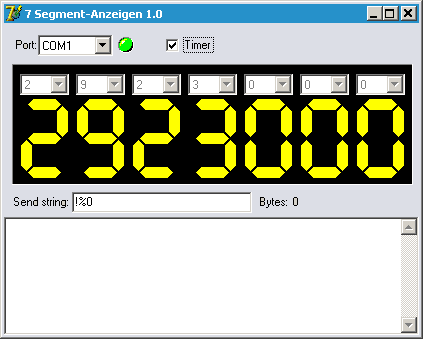
The detailed description of this program is currently available in German only. The summary above, prices and screenshots apply to all languages.
A program for testing the connection between a computer and a large scoreboard.
Das Programm ausführen auf dem Rechner, wo Display angeschlossen ist.
Port auswählen = es soll dann grün leuchten.
Über Ziffern aus dem ComBox Ziffern auswählen für jeden Platz
Wenn alles funktioniert, dann Timer-Klick (Countdown zum Testen)
Sagen Sie uns was Sie sehen. Was funktioniert und was nicht?
Unter Ziffern gibt es eine Zeile für Ihr Display.
Ganz unten Text vom Ihren Display (Feedback).
Sagen Sie uns was wird da geschrieben / angezeigt.
Am Besten als Bild „Alt+PrintScreen“.gif
Programm 2:
Schritt für Schritt:
A.) Anzeigetafel anschliessen
B.) COM-Port auswählen
C.) Öffnen
Es gibt 6 verschiedene Varianten Flow+Dtr:
1) DRV- i Flow=None
2) DRV- i Flow=XonXoff
3) DRV- i Flow=RtsCts
4) DRV+ i Flow=None
5) DRV+ i Flow=XonXoff
6) DRV+ i Flow=RtsCts
D) Nach jeder Variante 1)...6) drücken SEND
E) Versuchen Sie die Zeile Daten umtauschen auf 00001234
Antworten Sie bitte schnell